Configuring the popup in Blockshop
The popup lives in Edit theme → Popups, an overlay section that appears across the whole store. It is not the announcement bar (that's on the Header section), not checkout, and it does not send email campaigns by itself: Shopify Inbox, discount codes, and email delivery are all separate.
Compatibility
Image (and left/right or top placement) options on the Newsletter (small) and Newsletter (large) popup blocks require version 13.2.0 and up. Video media requires 13.3.0 and up.
Popups section
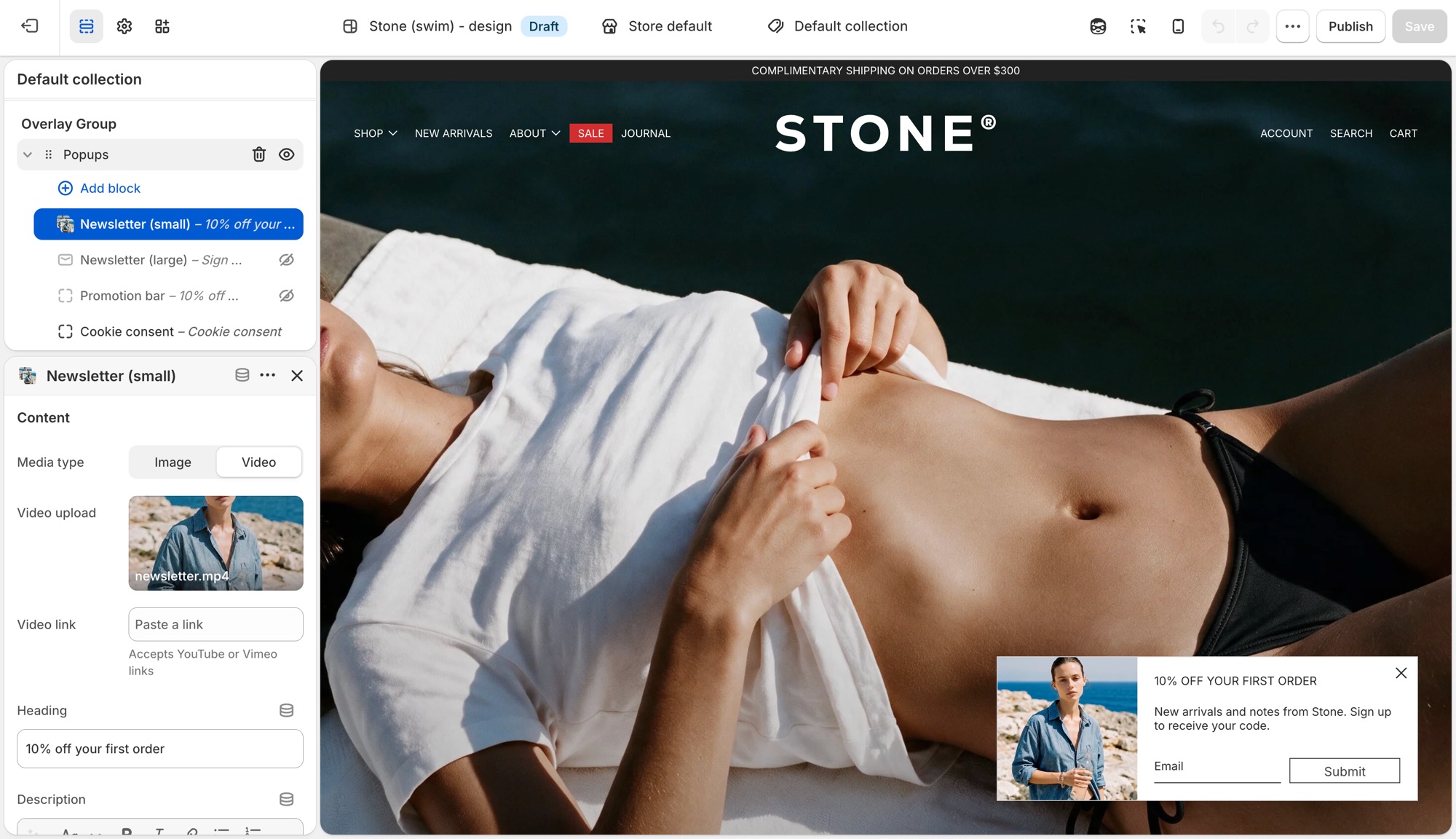
Edit theme → Popups. By default it already has a Newsletter (small), Promotion bar, and Cookie consent block. Click a block's eye icon to show or hide it, or Add block for another type:
- Newsletter (small) – corner overlay with an email field.
- Newsletter (large) – centered overlay modal.
- Promotion bar – sticky bar with a message; can scroll like a ticker (Scroll text, with separate speed controls for desktop and mobile).
- Cookie consent – consent banner tied to Shopify's consent tracking API.
Heading, description, and button text live on each block, not in Theme settings.
Newsletter (small)
Corner overlay with an email field.
- Media type, Image, Video upload, Video link: shown when Show media is on; video accepts a Shopify upload or a YouTube/Vimeo link.
- Heading, Description: the popup's copy.
- Show social icons, Social media title: adds your social icons below the form.
- Background color, Translucent background: card styling.
- Popup width: maximum width on larger screens (300–500px).
- Show media, Media position (Left or Top): whether an image or video shows, and where. Media is hidden on mobile to meet Google's guidelines against intrusive interstitials.
- Heading type, Paragraph font size, Text color, Text alignment: text styling.
- Button text, Button style: set the submit button's label and style. Leave Button text blank to show an arrow icon instead of a labeled button.
- Timing and targeting settings (Popup delay, Show again after, and so on) are shared with Promotion bar. See Timing and frequency below.
Newsletter (large)
Centered overlay modal, with the same settings as Newsletter (small) above, except:
- Popup width ranges wider (500–900px), since it's a centered modal rather than a corner card.
- Media position is Left or Right instead of Left/Top.
Promotion bar
Sticky bar with a message.
- Description: the bar's message text.
- Background color, Translucent background.
- Scroll text, Scroll speed: ticker effect on desktop, plus a separate Scroll text/Scroll speed pair under Mobile so the ticker can run independently (or not at all) per device.
- Heading type: Medium or Small text size.
- Text color.
- Timing and targeting settings are shared with the Newsletter blocks. See Timing and frequency below.
Cookie consent
Consent banner tied to Shopify's consent tracking API. See When cookie consent shows below for the conditions.
- Heading, Description.
- Background color, Translucent background.
- Position: Left, Bottom, or Right.
- Text color, Text alignment.
- Accept button style, Decline button style: each independently set to one of your four button styles, or a plain text Link.
Timing and frequency
Newsletter and Promotion bar blocks each have:
- Popup delay – seconds before it opens.
- Show popup at bottom of page – opens early if the visitor scrolls to the bottom first.
- Show again after – days before it reappears once dismissed. This is stored in the visitor's browser, not in Shopify, so it's per browser/device, not per customer.
- Limit to specific referrer path / Limit to specific page – restrict where it can appear.
The section's own Limit to one popup per page load setting controls whether only the first ready popup shows, or they queue one after another. Cookie consent always takes priority when it needs to appear.
When cookie consent shows
Cookie consent only shows where Shopify's consent tracking API determines a banner is required, and only if the visitor doesn't already have a stored choice. It won't show for everyone. Customer privacy tracking limits must also be turned on in your Shopify admin (Settings → Customer privacy), or it won't show at all. Position and the Accept/Decline button styles are configurable; it doesn't use the delay/frequency settings above.
Previewing changes
Newsletter and Promotion bar popups do not open automatically while you're editing. That's expected, not a bug. Preview them from the storefront (or Preview), ideally in a private/incognito window, since Show again after is remembered by that browser and will suppress a popup you've already dismissed while testing.
Cookie consent is the exception: click it in the block list to preview it live in the editor.
Where newsletter forms live (section, overlay, popup, footer, password page): Setting up mailing lists and newsletters.
Troubleshooting
- Popup never appears: the block is hidden (eye icon); Show again after already fired for that browser (test in a private window); another popup is already showing and Limit to one popup per page load is on; or a separate app popup is competing. Turn off other popup app embeds.
- Cookie consent doesn't show: Customer privacy tracking isn't enabled in your Shopify admin, or the visitor's region/consent state doesn't require a banner.
- It won't preview in the editor: expected for Newsletter and Promotion bar blocks. Preview from the storefront instead.
- Announcement bar isn't here: that's on the Header section, not Popups.
- Form emails don't reach Mailchimp/Klaviyo: the popup only creates a Shopify customer (tagged
newsletter). See newsletters, or connect an app.