Social media in Emerge
Edit theme → Theme settings → Social media.
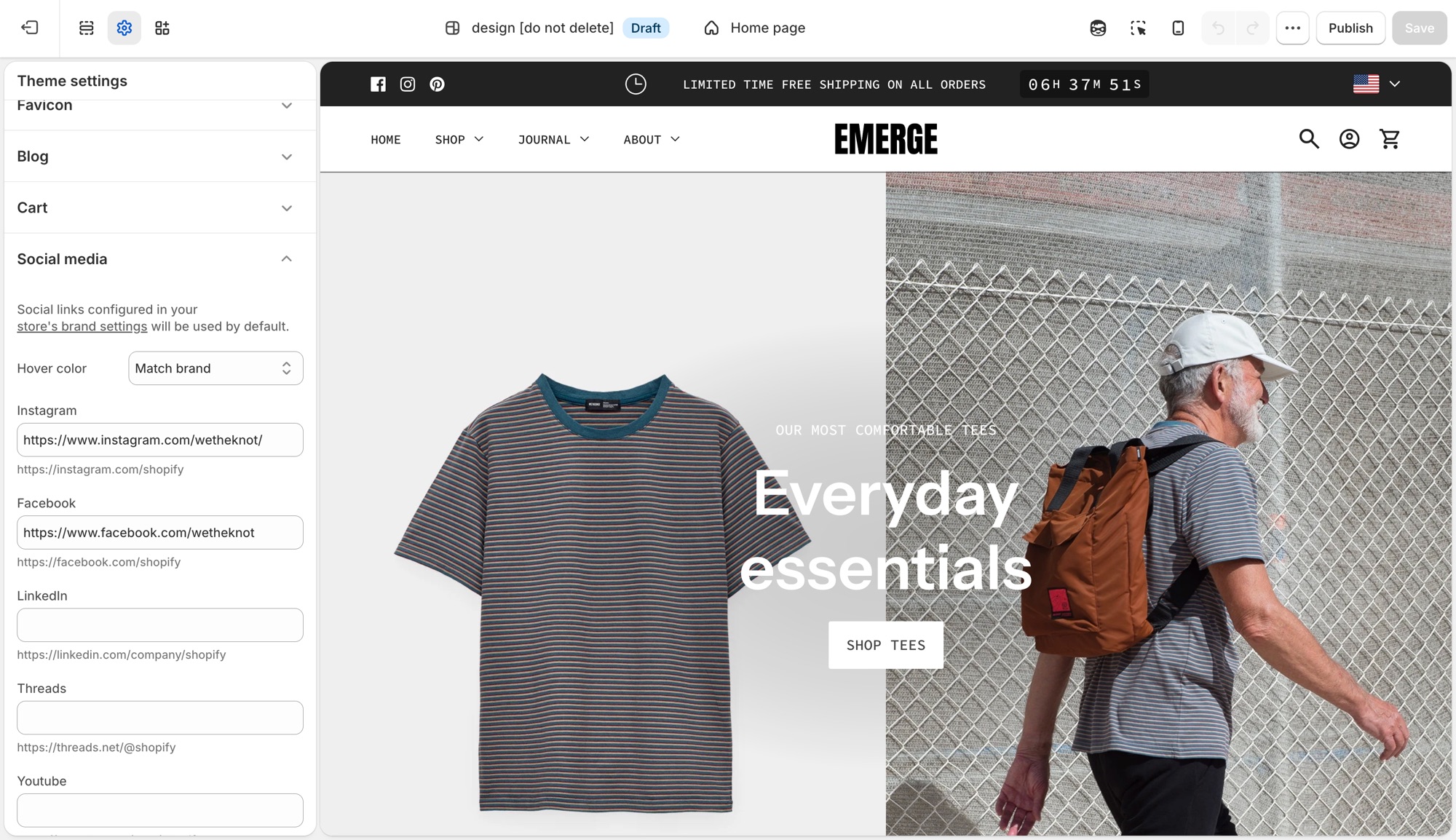
These settings control the social icons that appear in the footer, announcement bar, and other sections across the theme in one place, not per section.
Theme settings → Social media
- Hover color: Match brand (each platform's own color), Opacity (dims on hover), or None.
- One field per platform (Instagram, Facebook, LinkedIn, Threads, Youtube, Vimeo, Pinterest, 𝕏, TikTok, Tumblr, Snapchat, Bluesky): paste that profile's URL to show its icon.
Leave a platform blank and no icon shows for it. Sections do not need each icon toggled individually.
If you already added social links in Shopify's brand assets (Settings → General → Brand assets → Social links), the theme uses those by default and no further setup is needed here. A URL entered in Theme settings → Social media overrides the brand setting for that platform only. This is useful when a section-specific or seasonal account should differ from your main brand profile.
Troubleshooting
- An icon is not showing: that platform's URL field is empty here and in Settings → Brand.
- The wrong URL is showing: a value here always wins over Settings → Brand for that platform.
- Icons do not change color on hover: Hover color is set to None.